Enter password to view case study


A self-service portal where business customers set up their phone system, manage devices and order what they need next, on desktop and mobile.
TL;DR
Setting up a Mitel business phone system could take up to 45 days of back-and-forth with sales. I led the design of a self-service portal that cut average onboarding time by 35%, to about 23 days, while the product line grew revenue 29% year over year.
The problem. Onboarding meant configuring phone numbers, call routing, employees and devices across spreadsheets, emails and several tools. Customers couldn’t see what was left, call-routing rules moved through spreadsheets, and number transfers stalled offline.
What I changed
Turned onboarding into a guided journey customers can leave and resume. They see the whole setup, focus on one task at a time, and pause when information isn’t ready yet.
Made the hardest tasks self-service. A visual call-routing tree replaced spreadsheets, and number transfer moved online up to the carrier’s part.
Connected setup to everyday management. The dashboard keeps unfinished tasks visible, and device inventory links straight to guided ordering.
My role. UX Lead, leading 2 designers and partnering with a PM and a junior PM, an in-house researcher, 9–10 engineers (front end, back end and data), Sales, Activation and channel partners. 9-week design phase, 15 months overall.
Results after launch

35% shorter onboarding. Three months after launch, average onboarding time fell 35%, to about 23 days, from a process that could take up to 45 days.
29% revenue growth. The product line grew revenue 29% year over year.
24% better retention. 6-month customer retention improved 24% compared with the previous period.
Project snapshot
Role: UX Lead, leading 2 designers
Scope: Research · Information architecture · Onboarding flows · Dashboard · Device management and ordering · Responsive design · Accessibility
Users: Small-business owners · IT admins · Mitel channel partners
Company: Mitel, a business communications provider serving business users in 100+ countries
Partners: PM and junior PM · In-house researcher · Engineering (9–10: front end, back end, data) · Sales · Activation · Channel partners
Platforms: Desktop and mobile
Timeline: 9-week design phase · 15 months overall
Status: Launched
Context and challenge
Setting up a business phone system could take up to 45 days.
Mitel provides business communications software and phones. Onboarding a new business meant configuring a working phone system around its people, existing tools and needs, across six areas:
Services and devices: choose the software and physical phones.
Existing systems: connect business tools, such as a CRM.
Employee data: collect and organize user records.
Phone numbers: buy new numbers or transfer existing ones.
Call routing: define how incoming calls reach the right people.
Custom requirements: adapt settings to each business.
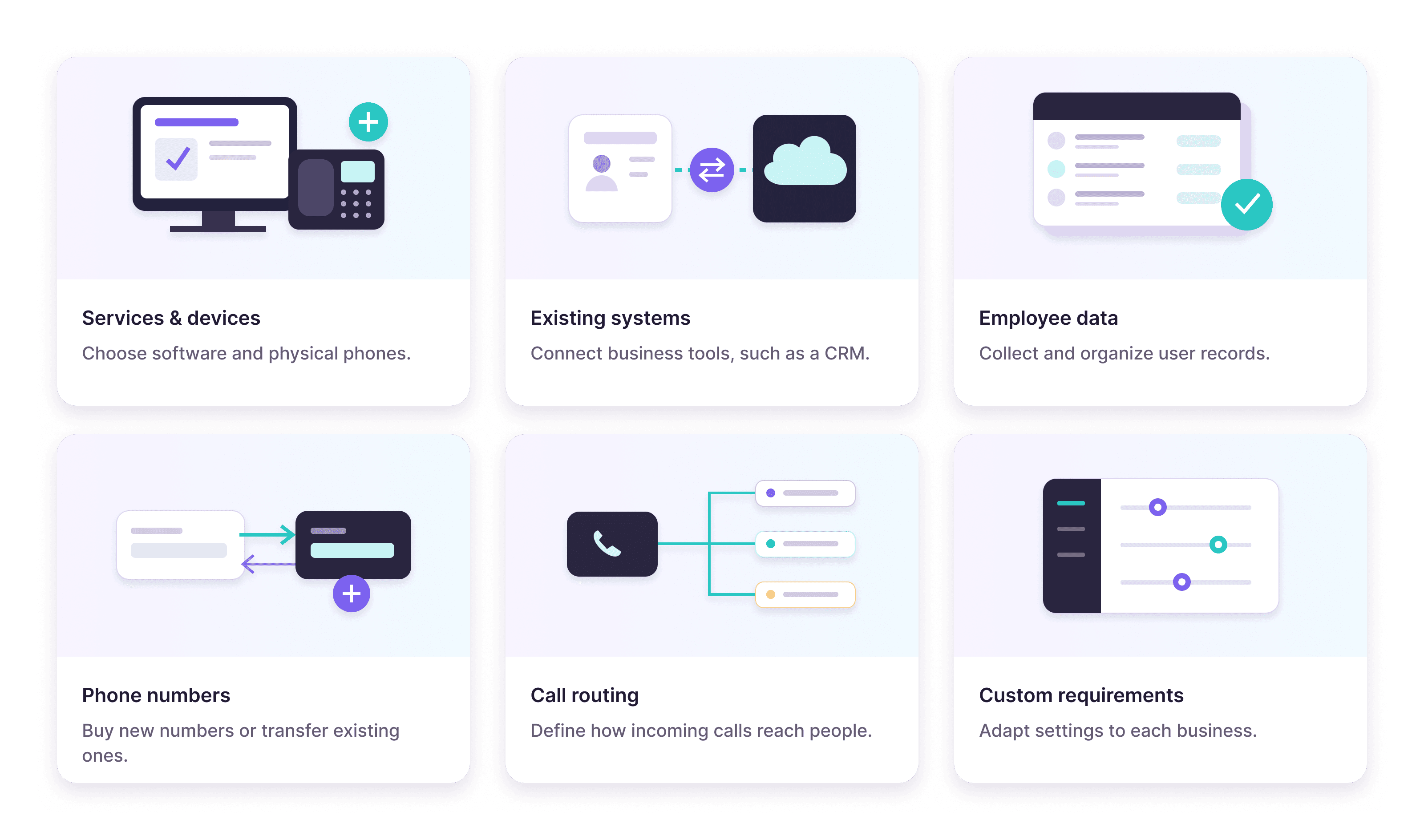
Most of the time went into hand-offs. Even one task, for example, call routing, took four steps between sales and the customer:
Sales emailed a configuration spreadsheet.
The customer filled in the call-routing rules.
Sales entered the rules into the system by hand.
The customer reviewed screenshots to confirm the setup.

The challenge: make complex setup understandable and actionable, so customers could finish more of it on their own and keep managing their service afterwards.
How I led
I led the design, and I led the designers.
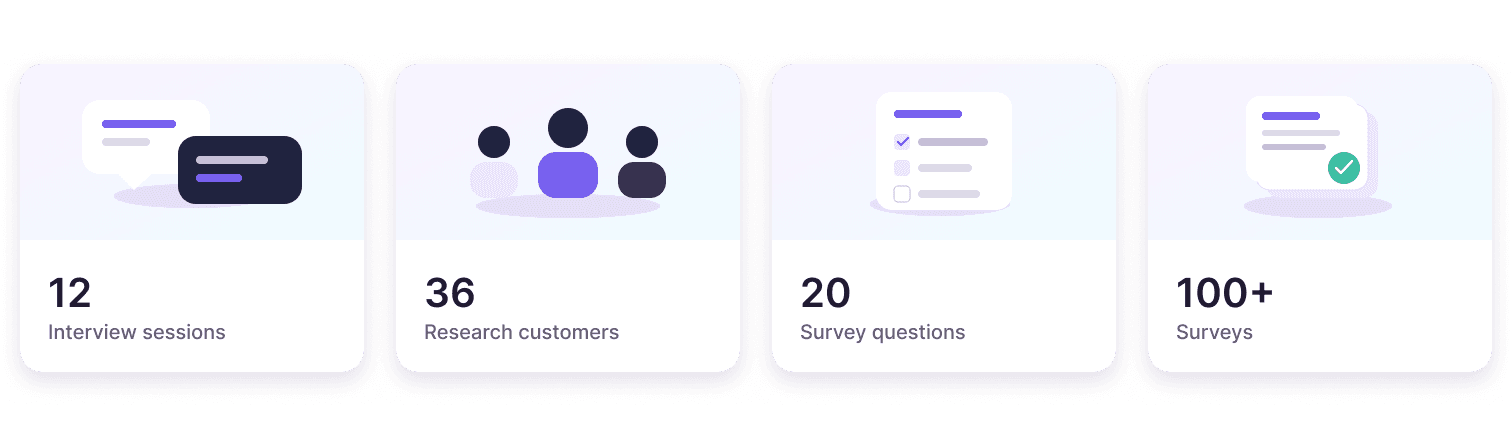
Led research with our in-house researcher. 12 interview sessions with 36 customers, plus a 20-question survey sent to 100+ people. I brought my two designers into planning, hosting interviews and analyzing the survey.
Defined the structure first. I designed the portal’s information architecture and key screens; the designers then built out sub-screens and use cases from them.
Coached designers through reviews. I guided them hands-on as they ran design reviews with the PM and engineers.
Pushed for guided device selection in the MVP. “Help Me Choose” made it into the first release.
Contributed beyond screens. Component-library contributions and accessibility reporting.
Trade-offs I navigated
Each major decision meant convincing someone or accepting a limit.
Guided device selection in the MVP · with Product
Browse-and-compare served customers who knew what they wanted, but many small businesses didn’t know which phone fit.
Decision: I made the case for “Help Me Choose” in the first release, and it shipped in the MVP. It asks about intended use and connected equipment, with an “I’m not sure yet” option.
AI recommendations · with Product and Engineering
I proposed personalized device suggestions based on each business’s context, but the infrastructure wasn’t ready.
Decision: AI recommendations moved to a fast follow, and I recommended prioritizing them as soon as the infrastructure was ready.
Number transfer limits · with Engineering and Activation
The carrier’s part of a number transfer takes 1–2 weeks, and Mitel can’t shorten it.
Decision: Customers complete the request online, with invoice upload to reduce typing, and the portal shows clearly that a submitted request is not yet a completed transfer.
Research
Two kinds of customers, five kinds of work, three places people stalled.
With our in-house researcher, I ran 12 interview sessions with 36 customers and a 20-question survey sent to 100+ people.
User persona
Small-business owners like Jim set up the system themselves and need guidance. IT admins like Alice manage many departments and need control. The same portal had to serve both.

What we learned from the user research
The research defined 12 functions a new customer needs, grouped into five categories: People, Company, Numbers, Call routing and Account. It also showed where people stalled: progress was hard to see, call routing was hard to set up, and number transfer was slow.

Key design decisions: onboarding
1. A guided journey you can leave and come back to
One progress bar couldn’t show where customers were inside a multi-step task. I explored four navigation layouts, and feedback favored an explicit secondary navigation on the left. Customers see the whole journey, focus on the current task, and pause when information isn’t ready.

Decision: guide at two levels: the overall journey and the steps within each task.
2. Call routing as a visual tree
Customers used to describe routing rules in spreadsheets. A visual tree shows how the time of day decides the route and keypad choices decide the destination, with separate schedules for business hours, after hours and holidays.
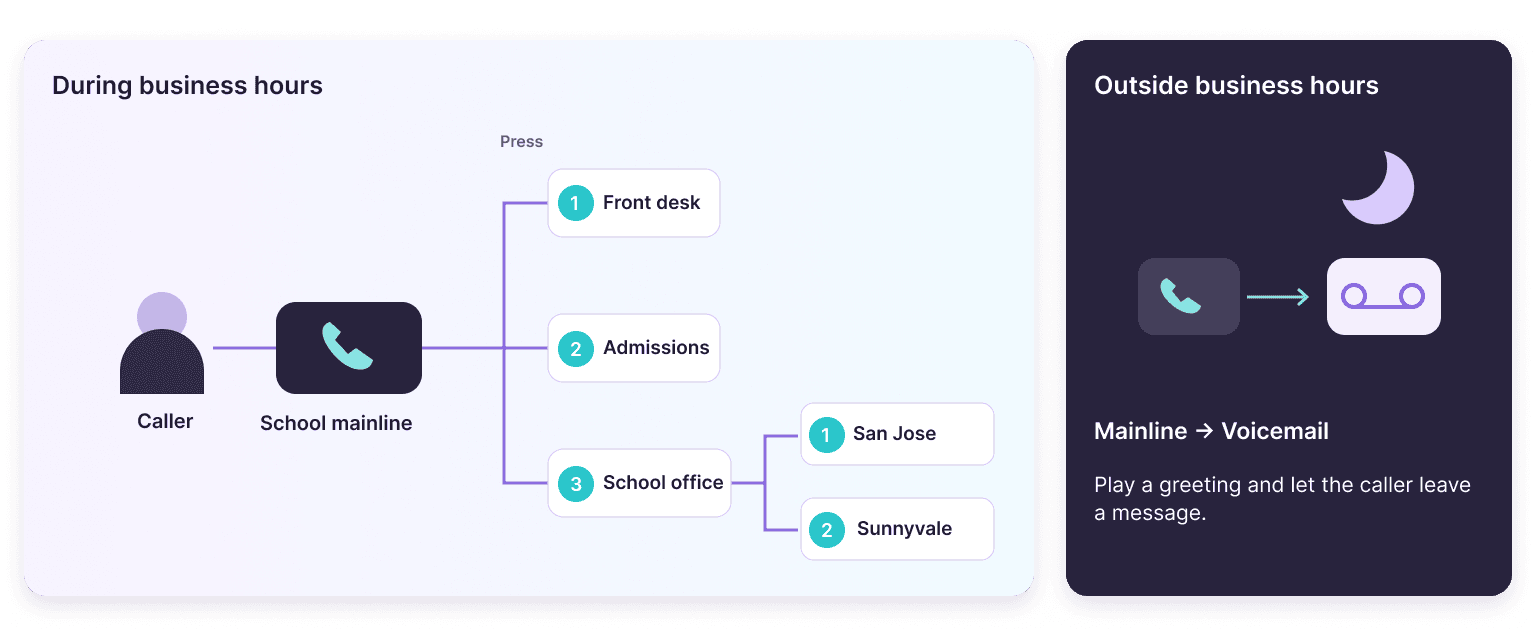

Decision: Let customers build and change their own call-routing rules. They no longer wait for sales to enter rules or send screenshots to confirm, and improve data visualization so the whole call flow is shown as a tree they can understand at a glance.
3. Number transfer that’s honest about what comes next
Customers enter their details, upload an invoice instead of retyping it, authorize and submit. The carrier then needs 1–2 weeks.


Decision: separate “request submitted” from “transfer complete”, so customers know what they’ve finished and what they’re waiting for.
Key design decisions: dashboard and devices
4. A dashboard that starts with what needs attention
Previously, customers completed onboarding across separate systems and offline conversations. Only then did they receive login credentials for the management portal—and encounter this dashboard. The old dashboard listed account records but not priorities.

Account details were visible. Priorities were not.
I redesigned it so IT admins can see account activity, spot what needs attention and take the next step:
Key information at a glance. Call volume, call duration, billing and account summaries in one overview.
Customizable widgets. Admins choose and order the information that matters to their work.
Unfinished task alerts. Admins can use the portal before onboarding is done, and open setup tasks stay visible with a clear path back.
Real-time tracking. Live status for orders and number transfers, with details one click away.

Decision: make the dashboard a starting point for action, not just a record of the account.
5. Start with the equipment already in use
Before ordering anything, admins need to know what they already have. I paired the device inventory with what matters for that decision:
Inventory summary. Phones, user assignments, rental and purchase totals, and recurring charges.
Find it fast. Search, filters and configurable columns.
Details in place. A side panel shows a phone’s assignment and service details without leaving the list.
“Get More”. One step from the inventory to ordering new devices.

Decision: start ordering from what customers already own, so new phones fit their setup and costs.
6. Help customers choose with confidence
Customers know very different amounts about phones, so I designed more than one way to choose:
Browse and compare. Customers who know their requirements compare prices, features and accessories side by side, without switching between product pages.
“Help Me Choose”. A few questions about intended use and connected equipment, with an “I’m not sure yet” option, lead to matching phones. I pushed for it in the MVP, and it shipped.
AI recommendations (fast follow). Personalized suggestions based on each business’s context, planned once the infrastructure is ready.
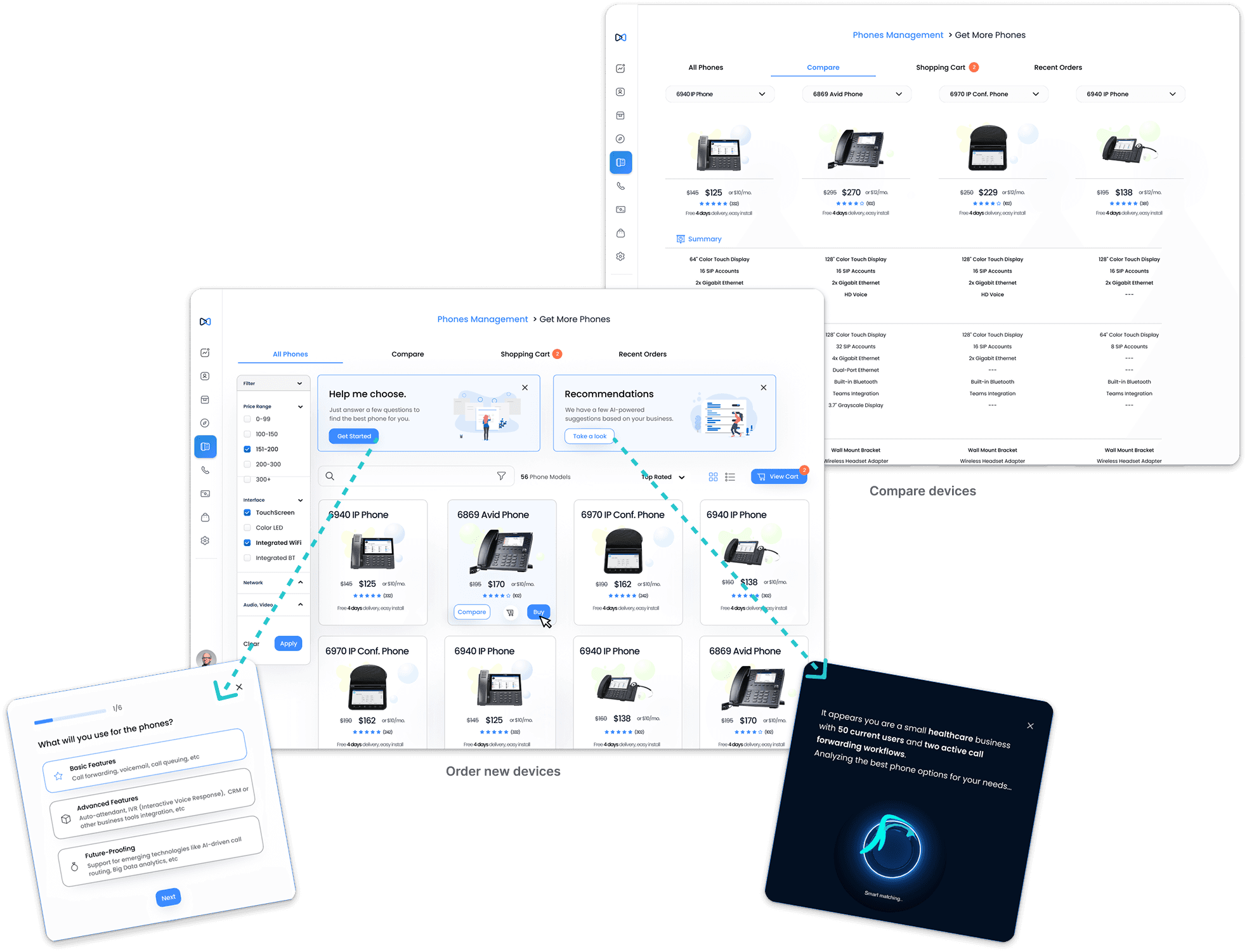
Decision: give both confident and unsure buyers their own path in the same flow.
Outcome and impact
Three months after launch, average onboarding time fell 35%, to about 23 days.
Onboarding time: 35% shorter on average, about 23 days. Most of what remains is the carrier’s 1–2 weeks for number transfers, which Mitel can’t shorten.
Revenue: 29% growth year over year for the product line.
Retention: 24% better 6-month customer retention than the previous period.
These results reflect work across product, engineering, operations and go-to-market, not design alone.
What customers said

Next. Proactive AI-powered recommendations, simple-by-default permissions, measuring the quality of device choices, and integrations with CRM and employee systems.
Reflection
1. Grow designers by giving them structure.
I designed the IA and key screens, then my two junior designers built out the sub-screens. I led design reviews with the PM and engineers, and the junior designers joined to share their input. Next time, I’d hand over a whole flow earlier, so they own a decision end to end.
2. Self-service is a business decision, not just a UX pattern.
Moving setup from sales into the product didn’t just simplify the flow. It shortened time to value, removed manual entry for sales, and moved alongside revenue and retention. Now I agree on a shared metric with Sales and Activation from day one, instead of judging success by task completion alone.
3. Design for different needs and levels of proficiency.
First-time small-business owners needed guidance; IT admins managing many departments needed speed and control. Instead of basic and advanced versions, I built both into the same flows. For example, “Help Me Choose” next to side-by-side device comparison, one-by-one or bulk employee setup, and onboarding customers can save and resume. Now I map users by need and proficiency before deciding how much guidance a screen carries.