Enter password to view case study


Helping operations teams find what matters, navigate complex project information, and take the next step with AI assistance.
TL;DR
Origin is the internal platform 100+ GoodLeap Partner Operations (Partner Ops) specialists use to run financing for 1.5M+ customers and 20,000+ contractors, with more than $6B in applications. My PM and I turned a requested facelift into a redesign of how operations work gets done, and it shipped.
The problem. Partner Ops had the data but no clear next step. Work was scattered, reviews were manual, and missed follow-ups stalled projects, slowed funding and let credit approvals expire. There was no partner health data at all.
What I changed
Pushed the scope from a facelift to a restructure. The ask was a visual upgrade to match the new design system. I made the case that a reskin wouldn’t fix the efficiency problem, and reorganized Origin around tasks.
Turned a planned chatbot into AI built into daily work. Leadership planned a simple chatbot. My PM and I convinced them to build AI into the workflow instead. It now guides phone applications, ranks urgent work on Home, summarizes each project's next steps, and flags partner issues.
Set the rules for AI. AI summarizes, flags and drafts; people decide, and nothing is sent without review.
My role. UX Lead and end-to-end design owner, partnering with Product, Engineering, Operations and Compliance. 1 month of design, 7 months of phased build.
Early results from the first pilot group (13 of 100+ Partner Ops users)

Project snapshot
Role: UX Lead, end-to-end design owner
Scope: Information architecture · Core workflows · Visual system · AI interaction design · Research
Users: Partner Operations (100+ staff, primary) · Customer Support · Funding Ops · Admins · Managers
Scale: Supports 1.5M+ customers, 20,000+ contractors and $6B+ in financing applications
Partners: Product · Engineering · Operations · Compliance
Timeline: 1 month design · 7 months phased (P0/P1) build
Status: Shipped. Next: Transactions and more Partner Health metrics
Context and challenge
The information was there. The next step wasn’t.
A home-improvement loan moves through three products: contractors use GoodLeap Pro, homeowners use the Homeowner App, and GoodLeap’s internal teams use Origin to coordinate both.


A Partner Operations specialist might, in one hour, help a homeowner apply by phone, review a contractor’s documents, chase an unsigned agreement and check projects nearing credit expiry. The legacy Origin made that hard:
No place to start. Urgent work was spread across pages and tabs, with no shared view of who needed to act.
Manual reviews. Partner Ops checked documents and pieced together project context by hand.
Costly delays. A missed follow-up could expire a credit approval or block funding.
Partner performance was invisible. Teams couldn’t see which contractors needed help, or why.

The challenge: bring priorities, project context and partner insight into one workspace, without losing the detail experienced Partner Ops relied on.
How I led
I shaped what we built, not only how it looked.
Reframed the project. Leadership asked for a facelift: a UI upgrade onto the new design system. I showed that a reskin would leave the core efficiency problems in place, and made the case for restructuring the information architecture around tasks.
Expanded the AI strategy. Instead of a standalone chatbot, I designed AI into four workflows: phone applications, the Home dashboard, project reviews and partner insights. Each one shows its sources and leaves the decision to people.
Set five principles as the team’s decision filter. Organize by intent; lead with the next action; AI explains, people decide; one decision, the right message per role; private by default.
Phased the work. I split a 1-month design into P0 and P1 releases over 7 months, so the highest-impact workflows shipped first.
Kept a feedback loop after launch. My PM and I meet the Partner Ops team every week to hear what’s working and decide what to fix next.
Trade-offs I navigated
Each major decision meant convincing someone or giving something up.
Facelift or restructure · with Leadership
A reskin was faster, but wouldn’t fix how slow the work was.
Decision: Restructured the IA around tasks, alongside the design-system upgrade.
Backend rebuild effort · with Engineering
A task-based structure meant rebuilding much of the backend and more dev effort.
Decision: I brought interview and prototype-test results showing the old structure was slowing Partner Ops down. The team agreed to the rebuild.
MVP priorities · with Product
The MVP included a customer-satisfaction metric, but its data came from an internal system another team owned, and that dependency was blocked.
Decision: We moved the phone-assisted application flow up to MVP and deferred the satisfaction metric to a later Partner Health release.
Key design decisions
A structure built around the work
The legacy workspace split loans, leases and pending applications into separate areas. I reorganized it by task and stage: Applications for work in progress, Projects for submitted work, and a Review queue across all projects. Financing type became a filter.
The left navigation groups everything into Workspace, Lifecycle, Partners and Control, and a role switcher supports people with more than one job.

2. A Home that tells you where to start
“Start here” ranks urgent tasks with the next action and an estimated time. Each user can add widgets, such as credit-expiry monitoring or saved views, and filter by the partners they manage.

I kept the project detail layout people already trusted (summary, tabs, milestone timeline) and moved it onto GoodLeap’s new design library.

Decision: change the structure, keep the familiar detail view. That kept retraining low while fixing the real problem.
Workflows in practice
Helping a homeowner apply by phone
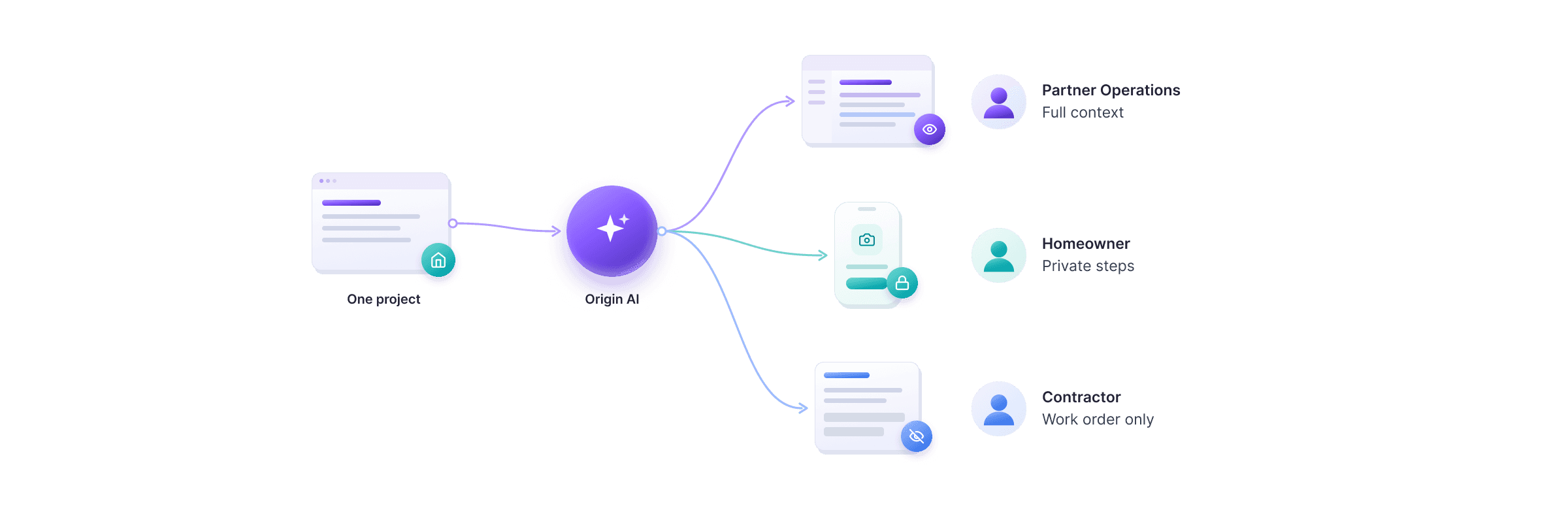
Partner Ops guide callers through applications. I designed one flow that brings customer info, offer comparison and a secure handoff together. AI finds existing leads, flags inconsistent data and suggests talking points. When private steps begin, the homeowner gets a secure link and finishes on their own device; Ops see progress, never the values.

Decision: draw clear lines between where AI assists, where Ops guide and where the homeowner takes over.
B. Moving an at-risk project forward
An AI brief summarizes what’s stuck and links to the records. In document review, AI flags possible issues next to each requirement; an authorized reviewer decides. Each person then gets the right task: the homeowner retakes a photo, the contractor sees the impact, Ops approve the drafted message.
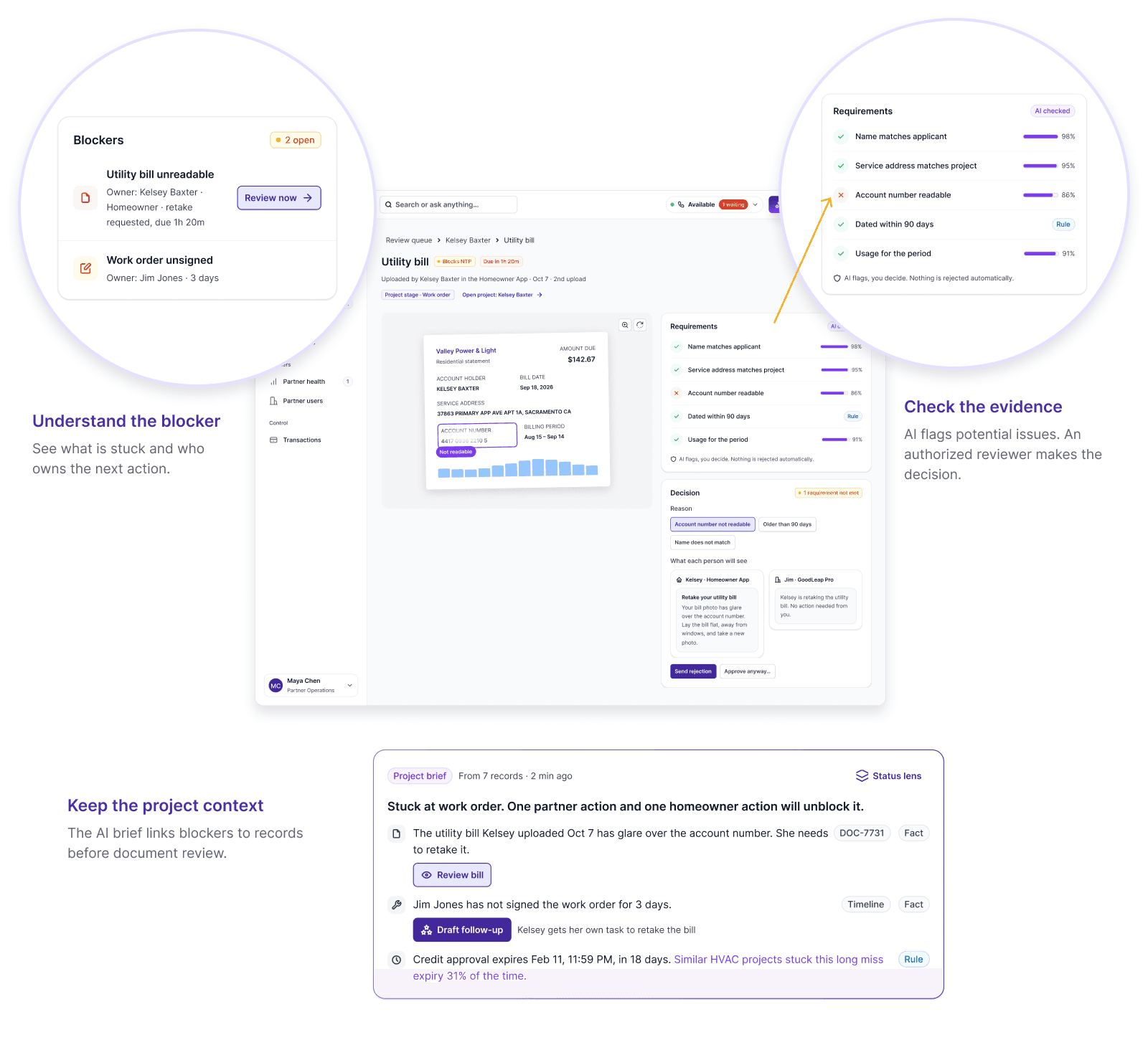
Decision: make ownership explicit, so every action reaches the person who can act on it.
C. Turning partner data into support
Partner Health shows funded volume, approval rate and time to fund across partners. Partner 360 adds document trends and rejection reasons, and AI highlights patterns such as repeated photo-quality issues.


Decision: organize every chart around three questions: what changed, where, and what to investigate.
AI with clear boundaries
AI prepares the work; people make the decision.
I defined three rules that applied across every workflow.
Show the basis
Summaries link to source records, and facts, business rules and predictions are labeled differently.

Assist, don’t decide
Financing decisions stay with the decision service; document decisions stay with authorized reviewers.

Respect roles
AI only sees and drafts what the current user is allowed to see; nothing is sent without review.
Outcome and impact
In a pilot with 13 Partner Ops users, document review time fell 43% versus the legacy Origin, and the credit expiration rate fell 9.5%.
Document review time: 43% shorter than in the legacy Origin
Credit expiration rate: 9.5% lower
AI feature adoption: 11 of 13 pilot users
Positive feedback: 13 of 13 pilot users
Validated before build
I tested the prototype with 5 frequent Origin users through a short survey and live sessions. All 5 endorsed the new navigation; most named Home and Partner Health as the views they’d rely on.

Feedback keeps shaping the product
One participant’s idea became the AI copilot for phone-assisted applications.
Requests for upsell and satisfaction insights now shape the Partner Health roadmap.
A concern about AI accuracy led us to plan ongoing reliability checks.
After launch, my PM and I meet Partner Ops weekly; feedback so far has been strongly positive.
Next. Transactions, more Partner Health metrics, and tracking AI accuracy against source records.
Reflection
1. Reframe scope with evidence, not opinion.
The facelift became a restructure, and Engineering agreed to a backend rebuild, because I used research to show where Partner Ops lost time. Next time, I’d bring that evidence into the very first scoping meeting.
2. Set AI boundaries before designing AI features.
Writing three AI rules early meant the team never had to re-debate them, and it built trust: 11 of 13 pilot users now use the AI. Next time, I’d prototype the failure cases, like a wrong flag, from the first round.
3. Know what not to change.
Experienced Partner Ops relied on the project detail layout: summary, tabs and milestone timeline. I kept it and moved it onto the new design system, so retraining stayed low while the real problems got fixed. Now I ask “what already works?” before redesigning anything.