Enter password to view case study


Helping contractors submit financing, hand off to homeowners and keep projects moving, on tablet and mobile.
TL;DR
GoodLeap Pro is the tablet and mobile app 20,000+ contractors use to submit home-improvement financing and manage projects through funding. I designed this 0→1 product end to end, and it shipped in 2026. Since launch, the approval rate is up 1.2%, projects stuck at documents for 7+ days are down 1.7%, and offer comparison drew 10,000+ clicks in its first month.
The problem. Contractors sell in the homeowner’s home, but their only tool was a desktop web portal. They could only view one financing offer at a time, which made comparing options tedious. The handoff to the homeowner was unclear, and after submission it was hard to see which project needed action.
What I changed
Pushed for side-by-side offer comparison. Contractors paged back and forth to compare terms. I designed a comparison that keeps the original offer anchored, so contractors can weigh options without starting over.
Made every handoff and next step explicit. Contractors pass the tablet or send a secure link, and the project list shows which project needs action first.
Set where AI helps and where rules decide. AI flags incomplete inputs and suggests the next action; eligibility, consent and disclosures stay with explicit rules.
My role. Staff UX Designer and end-to-end design owner, partnering with Product, 6–8 engineers (front end, back end and data), Legal/Compliance, Operations and Sales. 1 month of design and 5 months to the MVP launch, with tablet and mobile designed together.
Early results after launch

Project snapshot
Role: Staff UX Designer, end-to-end design owner
Scope: 0→1 product · End-to-end workflow · Information architecture · Responsive design · AI interaction design · Research
Users: Contractors (primary) · Homeowner applicants
Scale: 20,000+ contractors
Partners: Product · Engineering (6–8: front end, back end, data) · Legal/Compliance · Operations · Sales
Platforms: Tablet and mobile, designed together
Timeline: 1 month design · 5 months to MVP launch
Status: Shipped. Next: AI across the full lifecycle and Partner Health data
Context and challenge
The work happened in homeowners’ homes. The tools lived on desktops.
Contractors start the financing conversation in the homeowner’s home. Before GoodLeap Pro there was no tablet or mobile app, only a desktop web portal, so the most important moments happened on the wrong device.
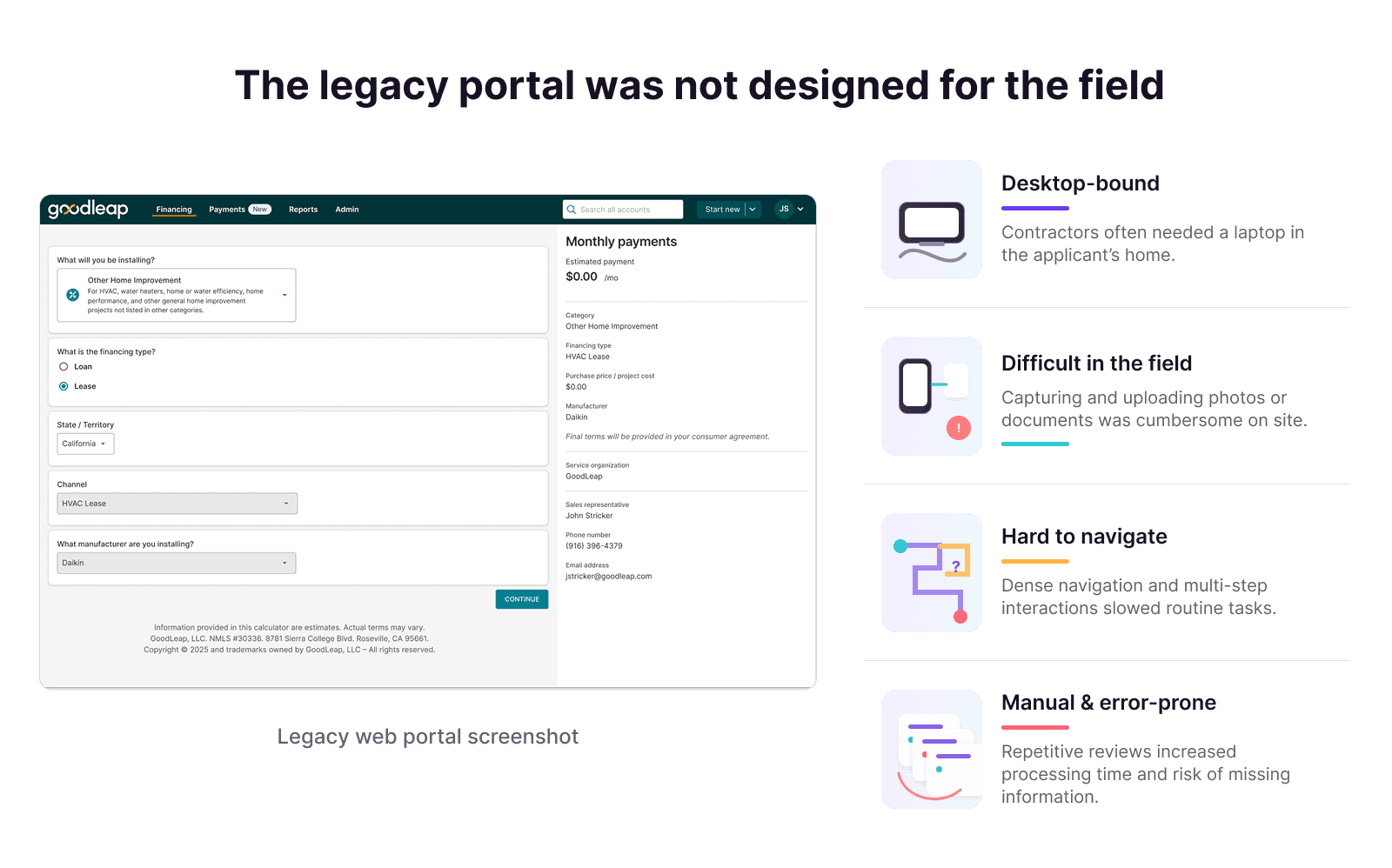
Desktop-bound. Contractors often needed a laptop in the homeowner’s home, and capturing photos or documents on site was cumbersome.
One offer at a time. To compare terms, contractors went back, changed the inputs and remembered the last result.
Unclear handoffs. The homeowner must complete the secure application personally, but the portal didn’t show who should act next.
No clear next step. After submission, dense pages and tabs hid which project needed attention.
The challenge: make a regulated, multi-user financing process easy to finish on tablet and mobile, without changing its business logic.

How I led
I shaped what we built, not only how it looked.
Championed offer comparison. Contractors kept asking to compare offers, but the calculator showed one at a time. I designed and pushed for side-by-side comparison, and validated it with users before build.
Kept the process, redesigned the path through it. The financing sequence, legal review and project states stayed the same. That kept Legal aligned and retraining short for contractors and Ops.
Pushed for more AI, and planned a fallback. I proposed AI that summarizes the most urgent projects, a chatbot for project status, and richer context inside each project. When the MVP scope moved this to the next release, I added a priority signal to the project list so urgent work stayed visible.
Set five principles as the team’s decision filter. Clear ownership; preserve compliance; make states actionable; design for interruption; adapt structure, not content.
Designed tablet and mobile together. One information system for both, so mobile isn’t a cut-down tablet.

Trade-offs I navigated
Each major decision meant convincing someone or giving something up.
Change the process, or the path through it · with Legal and Operations
A new flow could look simpler, but it would need a fresh legal review and retraining for contractors and Ops.
Decision: Kept the financing logic and redesigned the interactions, handoffs and feedback within it, so retraining stayed short.
AI ambition vs. the MVP timeline · with Product
I proposed AI summaries of urgent projects, a project-status chatbot and contextual insight in each project. A 0→1 MVP on a tight timeline couldn’t carry all of it.
Decision: The MVP shipped focused AI: input checks and next-action suggestions. The rest moved to the next release, and I added a priority signal to the project list to cover the gap.
Partner Health tab · with Product
We considered a tab showing each partner’s key metrics.
Decision: Moved it to post-MVP so the submission and project flows could launch on time.
Key design decisions
1. Compare offers without starting over
The old calculator showed one offer at a time. As one contractor put it: “If an applicant wants to see a different term or monthly payment, I have to go back, change the selection, and remember the previous result.” I turned it into side-by-side cards: the original offer stays anchored, and contractors can edit, remove or add a third option, then select one.

Decision: keep the homeowner’s starting point visible, so every alternative is compared against it.
2. A clear handoff to the homeowner
Once an offer is selected, the homeowner owns the next step. Contractors pass the tablet, or send a secure link to the homeowner’s own device. Both paths keep the selected offer and show who acts next, and the contractor’s prep stays separate from the homeowner’s private information.
Decision: make the change of ownership visible at the moment it happens.
Project management in the field
3. Find the project that needs action
In the legacy portal, opening a project replaced the list, and the detail page showed account data rather than the next step. On tablet, I designed a list-and-detail workspace: projects that need attention are marked red, and each project shows the next action beside the milestone it moves forward.

Decision: reserve red for projects that need action, so priority reads at a glance.
4. The same workflow on mobile
On mobile, the list-and-detail view becomes a focused list-to-detail flow, side navigation moves to a bottom bar, and actions stack beside their milestone. The information and the red priority cue stay the same.

Decision: adapt the structure, not the content.
AI with clear boundaries
AI flags and suggests; rules and people decide.
I set three rules that applied across the product:
Rules protect compliance. Eligibility, consent, required fields and disclosures follow explicit business rules, not AI.
AI checks and suggests. During submission, AI flags missing or conflicting information. After submission, it reads the project state and suggests the next action. It never rewrites legal, financial or identity information.
People stay in control. Contractors confirm a step before it reaches the homeowner, and can correct or override a suggestion.
The interface shows the conclusion, what needs review and what to do next, rather than labeling it as AI. I applied the same rules to my own process: I used AI to speed up exploration, then checked AI-generated UI for responsiveness, accessibility and edge cases.

Outcome and impact
Compared with the 6 months before launch, the approval rate rose 1.2% and projects stuck at documents for 7+ days fell 1.7%.
Offer comparison: 10,000+ clicks in the first month after launch
Approval rate: 1.2% higher (relative change)
Projects stuck at documents for 7+ days: 1.7% fewer (relative change)
Contractor feedback: two post-launch sessions with strong positive feedback and ideas for the next iteration
Validated before build
I tested the prototype remotely with 5 contractors. All 5 found the original offer and added an alternative without losing it, and all 5 found the project that needed attention and its next step.

What testing changed
One participant noted that not every homeowner knows Flexpay, so I added a plain-language “learn more” link.
Participants read monthly payment first, so I aligned payment, term and rate for easier scanning.
Participants used red to find urgent projects, so I reserved red for projects that need action.
Next. AI across the whole lifecycle, such as a project chatbot and smart summaries and recommendations, plus Partner Health data.
Reflection
1. Plan the fallback when scope gets cut.
When AI moved out of the MVP, a simple priority signal kept urgent projects visible. If another proposal gets cut for scope, I’ll look for a fallback that still meets the core need.
2. Find the fixed rules before sketching flows.
Keeping the financing logic kept Legal aligned and retraining short, and helped a 0→1 product stay on its 5-month MVP timeline. Now I map what can’t change before I explore what can.
3. Watch the work where it happens.
Remote tests showed contractors understood the flows, but not how a handoff really feels in a homeowner’s home. Next time, I’d observe contractors on site before finalizing the handoff.